
Custom Liquid Section Documentation
The Custom Liquid section is a developer-focused section that lets you write and inject raw Liquid code directly into any page. It is useful for adding custom functionality, embedding third-party widgets, or rendering dynamic content that isn't covered by the theme's built-in sections.
Features
Raw Liquid Input: Write any valid Liquid code directly inside the section.
Color Scheme Support: Wraps your custom output in a themed container that respects the store's color schemes.
Padding Control: Adjustable top and bottom padding so the section fits naturally alongside others.
No Blocks: Intentionally block-free — all logic lives in the single Liquid field.
Settings
The following settings are available to customize the behavior and appearance of the Custom Liquid section.
Settings
Description
Default
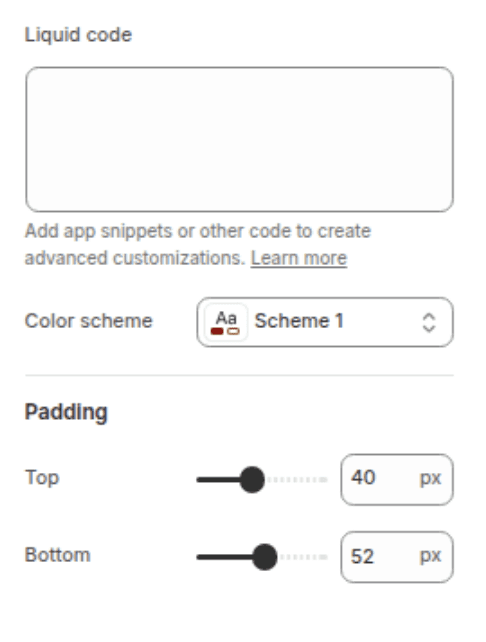
Custom Liquid
The Liquid code to render inside the section. Supports all standard Liquid tags, objects, and filters available in Shopify themes.
(empty)
Color scheme
Sets the background and text colors based on your theme's color schemes.
Scheme 1
Padding top
Sets the top padding of the section (0px – 100px).
40px
Padding bottom
Sets the bottom padding of the section (0px – 100px).
52px
Blocks
This section has no blocks. All content is controlled entirely through the Custom Liquid setting.
Customization Tips
Liquid Access: You have full access to Shopify's global Liquid objects inside this field — including
shop,cart,customer,product,collection, and more, depending on the page context.CSS & JS: You can include
<style>and<script>tags directly inside the Liquid field if you need to add scoped styles or scripts alongside your custom markup.Color Scheme: The section automatically wraps your output in a
color-schemediv, so text and background colors will adapt to whichever scheme you select — no extra CSS needed for basic theming.Testing: Use the theme editor preview to see your Liquid output in real time. Liquid errors will surface as blank output rather than visible error messages on the storefront.
Padding on Mobile: Padding values are automatically scaled down to 75% on screens narrower than 750px, so your spacing stays proportional on mobile without any extra work.
Copyright 2020-24 - All Right Reserved